


The Pros
- Same price as last year
- Great battery life
- Super light
The Cons
- Worse AI experience
- Camera change is a side grade
- No camera bar
Every year, Google’s Pixel lineup gets a little more confusing, especially as the A-series line continues to encroach on the base-level Pixel flagship.
When I reviewed the Pixel 8a and 7a, I thought both devices offered a similar enough experience to the Pixel 8 and 7, respectively, and there was little reason to actually buy the flagship Pixels. After using the Pixel 9a for about a week, I find myself thinking the same thing about it and the Pixel 9. However, the disparity is worse this year thanks to Google’s price hike on the flagship Pixel line.
The Pixel 9 retails for $1,099 in Canada, up from the $949 Pixel 8. But the Pixel 9a costs the same $679 as the Pixel 8a, which means it’s $420 cheaper than the Pixel 9 in Canada. And that begs the question, what do you get for an extra $420?
Truthfully, not much.
Specs

Pixel 8a
Pixel 9a
Pixel 9
Pixel 9 Pro
Display
6.1-inch Actua 120Hz 1080x2400 OLED up to 1,400 nits HDR and 2,000 nits peak brightness
6.3-inch 1080x2424 Actua pOLED, 60-120Hz, 2,700nits peak brightness
6.3-inch FHD+ (1080 x 2424 ) OLED Actua Display, 422ppi, 60-120Hz refresh rate
1280 x 2856 LTPO OLED 120Hz, 3,000 nits peak brightness
Processor
Tensor G3
Google Tensor G4
Tensor G4
Tensor G4
RAM
8GB
8GB
12GB of RAM
16GB
Storage
128GB / 256GB
128GB/256GB
128GB, 256GB
128GB, 256GB, 512GB, 1TB
Dimensions (in.)
152.1 x 72.7 x 8.9mm
154.7 x 73.3 x 8.9mm
152.8 x 71.9 x 8.5mm
152.8 x 72 x 8.5 mm (6.02 x 2.83 x 0.33 in)
Weight
188g
185.9g
198g
199 g (7.02 oz)
Rear Facing Camera
64-megapixel wide and 13-megapixel ultrawide
48-megapixel f/1.7 wide, 13-megapixel f/2.2 ultrawide
50-megapixel (f/1.7) + 48-megapixel (f/1.7, ultrawide)
50-megapixel (f/1.7) + 48-megapixel (telephoto 5x zoom) + 48-megapixel (ultrawide)
Front Facing Camera
13-megapixel
13-megapixel f/2.2
10.5-megapixel
42-megapixel f/2.2
OS
Android 14
Android 15
Android 14
Android 14
Battery
4,492mAh
5,100mAh
4700mAh
4,700mAh
Network Connectivity
5G Sub-6, LTE, HSPA+
5G, LTE
LTE/5G
GSM / HSPA / LTE / 5G
Sensors
Proximity sensor, ambient light sensor, accelerometer, gyrometer, magnetometer, barometer
Under-display fingerprint, proximity, ambient light, accelerometer, gyrometer, magnetometer, barometer
Fingerprint (in-display), accelerometor, gyro, proximity, compass
Fingerprint (under display, ultrasonic), accelerometer, gyro, proximity, compass, barometer, thermometer (skin temperature)
SIM Type
Nano SIM and eSIM
Dual (1x Nano SIM, eSIM)
Nano SIM, eSIM
Nano SIM and eSIM
Launch Date
May 14, 2024
August 22, 2024
September 9, 2024
Misc
Colours: Obsidian, Porcelain, Bay, Aloe
Colours: Obsidian, Porcelain, Iris, Peony
Colours: Obsidian, Porcelain, Wintergreen, Peony
Colours: Porcelain, Rose Quartz, Hazel, Obsidian
Display
Pixel 8a
6.1-inch Actua 120Hz 1080x2400 OLED up to 1,400 nits HDR and 2,000 nits peak brightness
Pixel 9a
6.3-inch 1080x2424 Actua pOLED, 60-120Hz, 2,700nits peak brightness
Pixel 9
6.3-inch FHD+ (1080 x 2424 ) OLED Actua Display, 422ppi, 60-120Hz refresh rate
Pixel 9 Pro
1280 x 2856 LTPO OLED 120Hz, 3,000 nits peak brightness
Processor
Pixel 8a
Tensor G3
Pixel 9a
Google Tensor G4
Pixel 9
Tensor G4
Pixel 9 Pro
Tensor G4
RAM
Pixel 8a
8GB
Pixel 9a
8GB
Pixel 9
12GB of RAM
Pixel 9 Pro
16GB
Storage
Pixel 8a
128GB / 256GB
Pixel 9a
128GB/256GB
Pixel 9
128GB, 256GB
Pixel 9 Pro
128GB, 256GB, 512GB, 1TB
Dimensions (in.)
Pixel 8a
152.1 x 72.7 x 8.9mm
Pixel 9a
154.7 x 73.3 x 8.9mm
Pixel 9
152.8 x 71.9 x 8.5mm
Pixel 9 Pro
152.8 x 72 x 8.5 mm (6.02 x 2.83 x 0.33 in)
Weight
Pixel 8a
188g
Pixel 9a
185.9g
Pixel 9
198g
Pixel 9 Pro
199 g (7.02 oz)
Rear Facing Camera
Pixel 8a
64-megapixel wide and 13-megapixel ultrawide
Pixel 9a
48-megapixel f/1.7 wide, 13-megapixel f/2.2 ultrawide
Pixel 9
50-megapixel (f/1.7) + 48-megapixel (f/1.7, ultrawide)
Pixel 9 Pro
50-megapixel (f/1.7) + 48-megapixel (telephoto 5x zoom) + 48-megapixel (ultrawide)
Front Facing Camera
Pixel 8a
13-megapixel
Pixel 9a
13-megapixel f/2.2
Pixel 9
10.5-megapixel
Pixel 9 Pro
42-megapixel f/2.2
OS
Pixel 8a
Android 14
Pixel 9a
Android 15
Pixel 9
Android 14
Pixel 9 Pro
Android 14
Battery
Pixel 8a
4,492mAh
Pixel 9a
5,100mAh
Pixel 9
4700mAh
Pixel 9 Pro
4,700mAh
Network Connectivity
Pixel 8a
5G Sub-6, LTE, HSPA+
Pixel 9a
5G, LTE
Pixel 9
LTE/5G
Pixel 9 Pro
GSM / HSPA / LTE / 5G
Sensors
Pixel 8a
Proximity sensor, ambient light sensor, accelerometer, gyrometer, magnetometer, barometer
Pixel 9a
Under-display fingerprint, proximity, ambient light, accelerometer, gyrometer, magnetometer, barometer
Pixel 9
Fingerprint (in-display), accelerometor, gyro, proximity, compass
Pixel 9 Pro
Fingerprint (under display, ultrasonic), accelerometer, gyro, proximity, compass, barometer, thermometer (skin temperature)
SIM Type
Pixel 8a
Nano SIM and eSIM
Pixel 9a
Dual (1x Nano SIM, eSIM)
Pixel 9
Nano SIM, eSIM
Pixel 9 Pro
Nano SIM and eSIM
Launch Date
Pixel 8a
May 14, 2024
Pixel 9a
Pixel 9
August 22, 2024
Pixel 9 Pro
September 9, 2024
Misc
Pixel 8a
Colours: Obsidian, Porcelain, Bay, Aloe
Pixel 9a
Colours: Obsidian, Porcelain, Iris, Peony
Pixel 9
Colours: Obsidian, Porcelain, Wintergreen, Peony
Pixel 9 Pro
Colours: Porcelain, Rose Quartz, Hazel, Obsidian
Ain’t nothing wrong with being flat
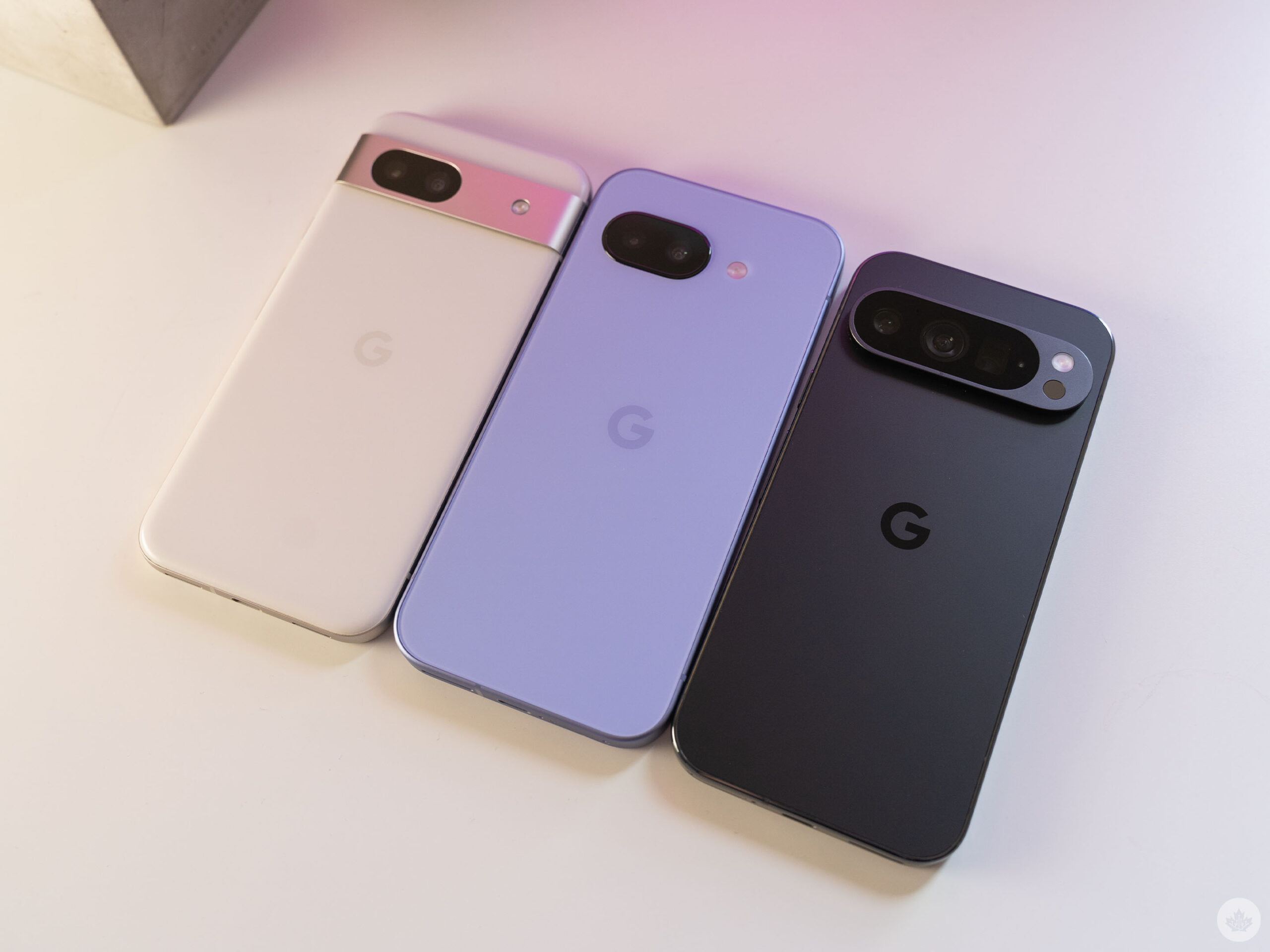
From left to right: Pixel 8a, Pixel 9a, Pixel 9 Pro.
The biggest visual difference between the Pixel 9a and Pixel 8a is the removal of the camera bar. There’s already been much ink spilled about the camera bar and the reasons for the change, which mostly stems from internal changes made to accommodate the handset’s larger battery. With that in mind, the trade-off is well worth it in my eyes – the Pixel 9a has impressed me with some of the best battery life in any Pixel I’ve tried in years (more on that below).
That said, there are tradeoffs to the removal of the camera bar. First, the Pixel 9a is less stable when lying on a table now, thanks to the slight bump from the camera sensors. The camera bar provides a stable, device-wide resting point when lying on a table, but the Pixel 9a is propped up slightly on one side by the cameras, allowing it to rock back and forth when it’s on a table.
It’s certainly not the worst camera-induced table wobble I’ve experienced in a smartphone, but it is annoying. That said, slapping a case on the phone addresses that.
Likewise, the other issue with this new design is that it exposes the rear camera to more potential damage than the old bar design. With the bar, there’s metal around the camera that prevents it from coming into direct contact with surfaces. Without the bar, the Pixel 9a rests on the camera glass directly, risking scratches. Again, it’s resolved by a case, but for those who prefer not to use a case, it’s something to keep in mind. I kept my Pixel 9a in a case through most of my testing period, so I haven’t seen how well the phone can hold up to abuse yet.
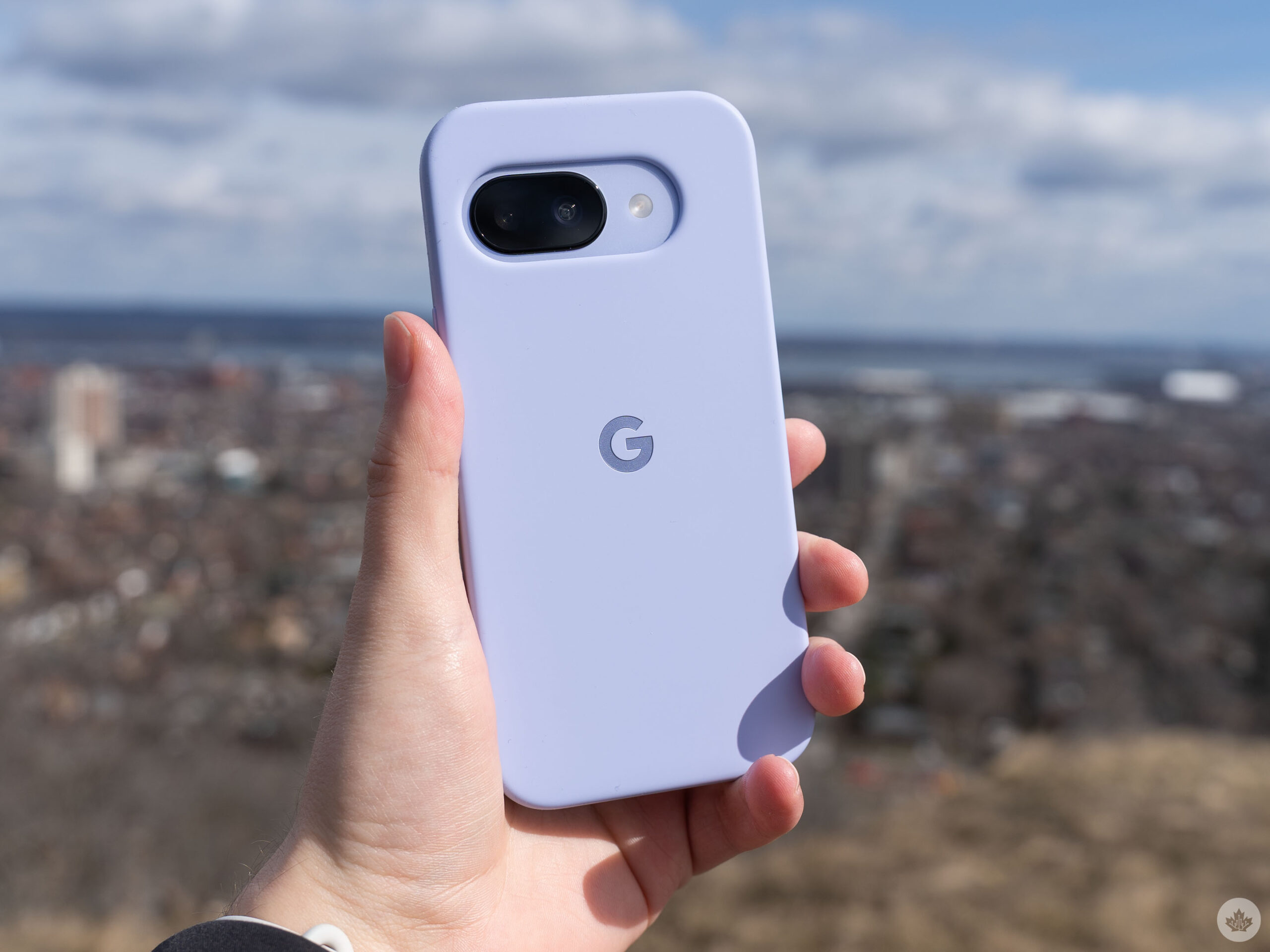
The Pixel 9a in Google’s case.
That said, I’ve always preferred going caseless, and the Pixel 9a is an excellent example of why. The device feels fantastic without a case. I attribute some of that to the slightly textured plastic back panel, which feels much better than the glossy glass on something like the Pixel 9.
The Pixel 9a is a tad on the large side but not out of bounds for me. It measures slightly larger than the Pixel 9 and 9 Pro and is a bit taller than the Pixel 8a. The handset is slightly thicker than all save the Pixel 8a, but it’s barely noticeable, even side-by-side. I think the reduced weight helps in that regard. The Pixel 9a is 185.9g compared to 188g for the 8a and 199g for the 9 Pro.
I really like how the Pixel 9a looks and feels, but I do miss some aspects of the camera bar. I think anyone who prefers to go caseless will really appreciate the Pixel 9a.
Tensor, but slightly worse

Google made a big deal about the Pixel 9a having the same Tensor G4 chip as the Pixel 9 series, something the company has said about previous A-series Pixels. However, past A-series Pixels had slightly less efficient versions of the same Tensor chip, leading to slightly worse performance and more heat. In my testing, the Pixel 9a continues this trend with slightly worse performance than other 9-series Pixels.
In benchmarks, the Pixel 9a scored slightly worse than the Pixel 9 Pro, 9 Pro XL, and 9 Pro Fold, though it did outperform the Pixel 9. (I suspect, however, that there might have been something funky going on when I benchmarked the Pixel 9 last year since it scored really poorly, worse even than the Pixel 8).
Of course, benchmarks aren’t everything. Like other Pixels, the Pixel 9a was remarkably smooth and fluid in everyday use and I had no issues with stuttering or jank. Apps worked great, everything loaded quickly, and I had no complaints. As I’ve written before, the Tensor G4 doesn’t hold up as well in more demanding tasks like gaming compared to options from Snapdragon, but most of the time, Tensor gets the job done.
Moreover, the handset uses the Exynos 5300 modem instead of the improved 5400 seen in the Pixel 9 series. This might be one of the biggest drawbacks of the Pixel 9a since the 5300 was also used in the Pixel 7 and Pixel 8, which were notorious for signal issues.
So far, I haven’t had any problems with the Pixel 9a on Public Mobile, which uses Telus’ network. Data has been speedy, even when tethering my laptop while riding the GO train, and call quality was also excellent. But I also never had issues with the 5300 in other Pixels. However, if you’ve had another Pixel with the 5300 modem and had issues, it’s worth keeping in mind that the 9a uses the same modem, so you might have problems with it too.
Battery marathon

If nothing else, people should take note of the Pixel 9a for it’s battery life. In my short time with the phone, it has really impressed me with its longevity.
To be fair, a week isn’t enough time to judge the battery life, especially when you factor in increased usage during testing and that Google’s adaptive battery tech takes time to learn habits and kick in. Still, despite all this, the Pixel 9a offered some of the best battery I’ve ever gotten out of a Pixel.
Multiple times during my testing period I was able to stretch the phone into a second day of use with no overnight charging. Moreover, I could even get two full days out of the phone, ending the second day with roughly 20 per cent battery and about six hours of screen-on-time. If this experience remains consistent, I’ll be comfortable charging the Pixel 9a every other night on a regular basis.
That’s better than the Pixel 9 and 9 Pro, which I could occasionally stretch into a second day but never lasted two full days for me.

Even on heavier use days, such as when I travel into the MobileSyrup office and tether my laptop so I can work on the train, the Pixel 9a held up well, dropping from 80 to 40 per cent charge over the course of the workday (including over two hours of tethering on the train) and it still lasted until around 11pm when I plugged in before bed.
Last year’s Pixel 8a also made strides with the battery, but the 9a is a much, much bigger improvement compared to the jump from the 7a to 8a. And the handset outlasting the Pixel 9 and 9 Pro is even more notable. Here’s hoping Google continues to squeeze larger batteries into its phones – I’m going to have a hard time going back to the 9 Pro after enjoying this longer battery life.
Competent camera

This year, Google swapped the camera hardware in the Pixel 9a, ditching the 64-megapixel primary shooter from the 8a in favour of the same 48-megapixel camera in the Pixel 9 Pro Fold, along with a basic 13-megapixel ultrawide camera. While, on paper, it may sound like a downgrade for the primary camera, in my testing, it was more of a side grade.
Generally, I found the Pixel 9a took fairly competent shots with the primary shooter. It was an all-around fine camera. It didn’t blow me away, but it was quietly reliable, which is exactly what I prefer in a smartphone camera. I want something I can quickly pull out of my pocket, snap a shot, and put it back away without thinking too much about it, and the 9a serves well in that regard.

Comparing the Pixel 8a, 9a and 9 Pro main sensor.
That said, the handset certainly isn’t as versatile as what you’d get from the Pixel 9 or 9 Pro. The Pixel 9 offers an improved 50-megapixel main camera and a 48-megapixel ultrawide shooter, and the Pixel 9 Pro includes that and another 48-megapixel 5x telephoto camera. (In my camera testing, I only used the Pixel 9 Pro for comparisons since it has the same sensors as the Pixel 9.)
In direct comparisons, I found that the main sensors of the Pixel 8a, 9a and 9 Pro all produced very similar results. At a glance, there is virtually no difference between the three; however when zooming in, the Pixel 9a loses a little bit of detail compared to the others. It’s not enough to make a significant difference in the overall photo, but it’s something to keep in mind if you like to crop photos often.

Pixel 8a, 9a and 9 Pro zoom comparison.
Unsurprisingly, when it comes to photographing distant objects, the Pixel 9 Pro blows both the 8a and 9a out of the water, thanks to its 5x optical zoom. Neither the Pixel 9a nor 8a are particularly great when zooming in because they don’t have a telephoto camera and thus no optical zoom, relying instead on sensor cropping. While it’s not entirely fair to compare to a phone with a telephoto camera, I bring this up because it’s one of the clearest examples of how the Pro Pixels set themselves apart from models like the 9a.


I slightly prefer the zoom results of the 9a to the 8a. Although it doesn’t capture quite as much detail as the 8a, the 8a zoom photos have a very smooth appearance, as if the camera algorithm went overboard trying to improve the image. By comparison, the 9 Pro’s telephoto camera maintains more detail and clarity at 5x and at max zoom.

Pixel 9a night shot comparison.
In low-light conditions, the Pixel 9a’s night shot comes really close to the Pixel 9 Pro, while the 8a has a lot more noise. The ultrawide shots are virtually indistinguishable to my eyes, though the 9 Pro has a little more clarity than the others.
Finally, when it comes to the selfie camera, the Pixel 9a is once again slightly better than the 8a but not quite as good as the 9 Pro. Weirdly, the colour balance seems a bit more yellow on the 9a, while the 8a leaned more red, and the 9 Pro kind of splits the difference between the two.

Pixel 8a, 9a and 9 Pro selfie comparison.
My main takeaway with the Pixel 9a camera is that’s fine and should be sufficient for the majority of people’s needs. However, with zoom shots, ultrawide, low light and other edge cases, the Pixel 9 or 9 Pro cameras will serve users better. Ultimately, it depends on how much of a camera user you are and how much you rely on your phone for good photography. The Pixel 9 Pro is the best option for dedicated photographers, but the 9a will work great for more casual shooters.
Everything else

With all of the big stuff out of the way, there are a few other small items worth pointing out about the Pixel 9a. First, I was pleasantly surprised by how good the haptics are on the Pixel 9a. They’re nearly on par with the haptics in the Pixel 9 Pro, though even slightly worse.
With previous A-series Pixel phones, I’ve found the haptics to be subpar, and I even listed them as a con in my Pixel 8a review. However, while using the Pixel 8a again to compare it with the 9a, I noticed the haptics have improved significantly, so perhaps Google adjusted a software update sometime in the last year.
I also found the speakers on the Pixel 9a to be sufficient. They were perfectly fine for phone calls and watching videos. They may not be the best speakers on a phone, but they are absolutely useable for most things.
Something that isn’t great, however, is the artificial intelligence (AI) situation on the Pixel 9a. Because the Pixel 9a only has 8GB of RAM, it has a smaller, less capable version of Gemini Nano, similar to the Pixel 8 and Galaxy S24. The smaller Nano model means some things don’t work as well, or at all, compared to the other Pixel 9 series devices. For example, Nano doesn’t run in the background and only works with text, which means features like the Pixel Screenshots app aren’t available on the 9a.
How much of an issue that is for you will depend on how much you use AI. I don’t use many AI features on my phone, and the vast majority of my interactions with Gemini are asking it to set timers for me, so I didn’t feel the loss (that said, Gemini felt slightly slower to respond on the 9a than on the 9 Pro).
Other core Pixel smart features that I’ve come to depend on, like Call Screen and the excellent voice-to-text, still work fine, so I really don’t think this is a big deal. But again, I don’t use AI like Gemini very much – if you are a heavy Gemini user, you might want to stick to the flagship Pixels.
Worth your money?

That brings us back to the most important question about the Pixel 9a: Is it worth your money? My answer is yes (but as always, with some caveats). First up, if you have an 8- or 7-series Pixel (or really, any phone released after 2022), I don’t think there’s a lot here to make upgrading worthwhile.
But if you are in the market for a new phone and looking at a Pixel, there are a few things you need to think about to make the right decision. The first and biggest question is about the camera. If you like photography and care about the cameras in your phone, the Pixel 9 Pro is the obvious choice (especially if you want a telephoto camera).
Looking beyond the camera, things get more complex. On paper, the Pixel 9 and 9 Pro are technically better than the 9a, but in real-world use, neither device feels that much better, aside from the camera. If your main concerns are cost and battery life, the Pixel 9a is the obvious choice, while if you’re a big AI user, there’s an argument to spring for the Pixel 9 since the 12GB of RAM will allow the use of regular Google Gemini. (I personally wouldn’t spend an extra $420 just for AI, but you do you.)
Outside the Pixel ecosystem, I also think the Pixel 9a is a really solid choice. The recently launched iPhone 16e immediately comes to mind as an alternative. On paper, the devices look really similar, but the iPhone 16e is $220 more expensive at $899. You get a much more powerful chip in the A18, which I’d argue means the 16e will have better longevity (though both devices will have at least five years of software support). Beyond the obvious differences between iOS and Android, I think the biggest area of consideration will be the camera. MobileSyrup will have an in-depth camera comparison in the coming weeks.
Score
Design: 9/10
Camera: 8/10
Battery: 9/10
Performance: 6/10
Enjoyment: 10/10
The Pixel 9a is a great option for anyone who wants Pixel smarts at a discount and/or good battery life.
MobileSyrup may earn a commission from purchases made via our links, which helps fund the journalism we provide free on our website. These links do not influence our editorial content. Support us here.

